
Control style packs (skins)
styles next to the exe, folder names, pack.json, and fixed file names.
A style pack is a set of control “skins”: default images for sliders, switches, buttons, and so on. The app scans styles/ next to RUI_Studio.exe and styles/ in the current project. This folder is not baked into the installer resources — copy styles when you copy the app.
Two pack kinds
| Kind | What you see | Use |
|---|---|---|
| Plain folder | styles/SomePack/ | Easiest for making and editing skins |
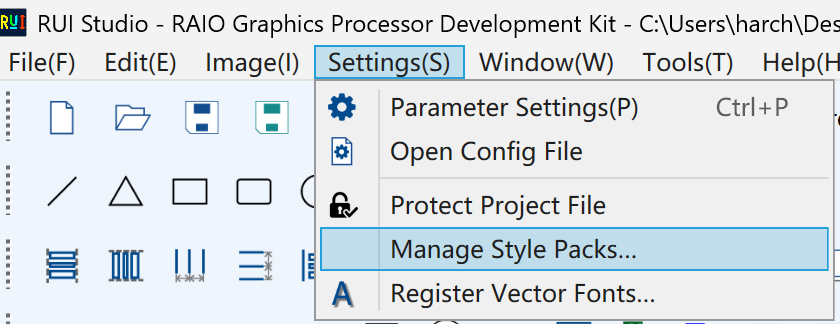
| Encrypted | SomePack.rui.style | Official builds; import via Settings → Manage style packs. Save as copies the whole pack into project styles/; it does not split skins into image/ |
Scan order (roughly): encrypted packs in the project → imported packs on this PC → encrypted packs next to the exe → project plain folders → exe-side plain folders. Same packId: the project wins.
The factory sample is usually styles/default_pack/.
How to build a plain folder
styles/
  my_pack/                 ← folder name should match packId
    pack.json              ← required
    slider/
    progressbar/
    switch/
    checkbox/
    button/
    radiobutton/
    textinput/
You do not need every widget. Only add the subfolders you use. Formats: .png / .jpg / .jpeg / .bmp.
Naming
- packId and folder name: lowercase English, digits, underscore — e.g.
default_pack,user_pack. No spaces or CJK in the folder name. - Subfolder names must be the English names above (
slider,switch, …), not a translated label. - Image file names are fixed in the tables below (do not add extra suffixes besides the extension). Pick any supported extension.
pack.json
Put one file at the pack root, for example:
{
  "packId": "my_pack",
  "displayName": "My style",
  "version": "1.0",
  "widgets": [ "slider", "progressbar", "switch", "checkbox", "button", "textinput" ]
}| Field | Meaning |
|---|---|
packId | Internal id; must match the folder name |
displayName | Name in the place-control dropdown |
version | Version string for you |
widgets | Which controls this pack includes. List only folders you actually made |
If widgets names a control that has no folder or required image, that skin fails or falls back to the default pack.
Fixed file names
Slider slider/
| File (no extension) | Required |
|---|---|
track1 | Yes (track 1; legacy track still works) |
track2 | No (second track) |
thumb | No (dual-track can work without a thumb) |
thumb_pressed | No (pressed thumb) |
Progress bar progressbar/
| File | Required |
|---|---|
track1 | Yes |
track2 | No |
No thumb images.
Switch switch/
| File | Required |
|---|---|
frame_1 (off), frame_5 (on) | Yes |
frame_2 ~ frame_4 | No (transition) |
frame_0 | No (invalid) |
Use an underscore: frame_1, not frame1.
Check box checkbox/
| File | Required |
|---|---|
frame1 unchecked, frame2 checked | Yes |
frame3 mixed | No |
frame1_disabled and the other two disabled | No |
frame1_pressed and the other two pressed | No |
Here it is frame1 with no underscore.
Nine-state button button/
Inactive / active / alarm × normal / disabled / pressed. Same naming as the check box: frame1–frame3 plus _disabled and _pressed.
Radio button radiobutton/
Unchecked / checked × normal / disabled / pressed (six images; no mixed frame3). Same frame1 / frame2 plus _disabled / _pressed.
Text input textinput/
| File | Required |
|---|---|
frame1 normal | Yes |
frame1_disabled | No |
frame1_pressed | No |
In the app
- Put the pack in
styles/next to the exe or the project. - Place the control and pick
displayNamein the style dropdown. - Encrypted packs come from us; import under Settings → Manage style packs. A plain pack appears as soon as the folder and
pack.jsonare valid — no import step.
- Save as: images used by a plain pack can go into project
image/; an encrypted pack copies.rui.styleinto projectstyles/.
If no pack is available, the app falls back to default_pack.
Encrypted packs
Encrypted packs (.rui.style) are built and shipped officially. Import them under Settings → Manage style packs, then pick them in the style dropdown.
To make your own skins, use a plain folder: styles/<packId>/ plus pack.json as above. You do not need to build an encrypted pack.